|
2a. If you get a security warning, cancel it by selecting
Keep from the pop-up menu.

2b. Now select open from the menu (or Double Click file).
2c. If Windows blocks the file select
Run Anyway.


2d. If you need to, open your Windows Download folder and
run the file.

2e. If you get a warning select
Keep Anyway

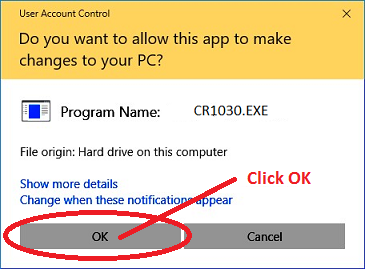
2f. If you get windows app changes warning select
OK.
2g. If you use additional anti-virus software you may
need to tell it to
TRUST Cadrail
using the anti-virus software.
3. The setup will run a few comments and then the Cadrail
installation application will start. If needed the Microsoft
.Net 3.5 Framework will be installed first. Follow the
screen instructions and continue to install the Framework. After the
Framework installation completes, the Cadrail Setup program begins.
Follow the setup screen
instructions to install the Cadrail application.
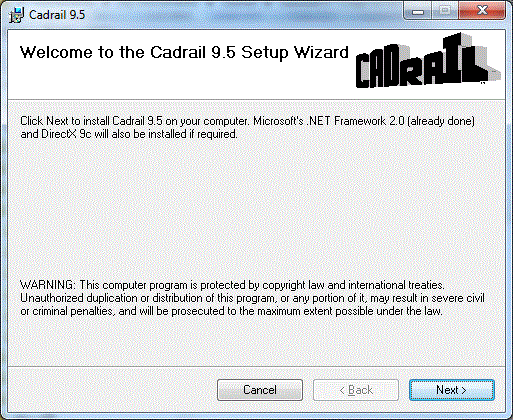
Note: the images shown are for Windows
10 systems with Edge browser.
If you have an earlier version you may see slightly
different images. The software or version number shown may be
different than your order.
Instructions for Windows 7.
Furthermore, Windows may provide other features to
organize the software you download into folders etc. See
your Windows documentation as needed.
See Also:
Help
You must have the
minimum required computer
system.
|